Writing
Speech to website: update your site from your phone
updated 2026-10-11
You can update a website by talking into your phone. Connect a coding agent to the repository, dictate a bounded change, inspect its preview, and approve publication. Your phone sends instructions. A connected computer or cloud environment edits, builds, and checks the site.
Let’s make one change that works: add a service FAQ to a practice website, inspect it on mobile, and keep production unchanged until you approve it. You’ll need one repository, one agent, and one hosting service. Add a database when the site actually needs one.
I’m turning this into a hands-on webinar. This guide is the living outline; see the webinar plans for the planned session. No date or price is set yet.
You’ll need: a phone, one supported authenticated agent connection, and a practice site. Download Practice Bike Repair and read its starter instructions. Its $75 tune-up and request target are invented teaching data. Begin with local preview; buying every service below is unnecessary.
You’ll finish with: a checked FAQ change and a repeatable voice-to-preview workflow. If directing a coding agent is new to you, start with the development guide.
Jump to connections, the spoken brief, or preview checks.
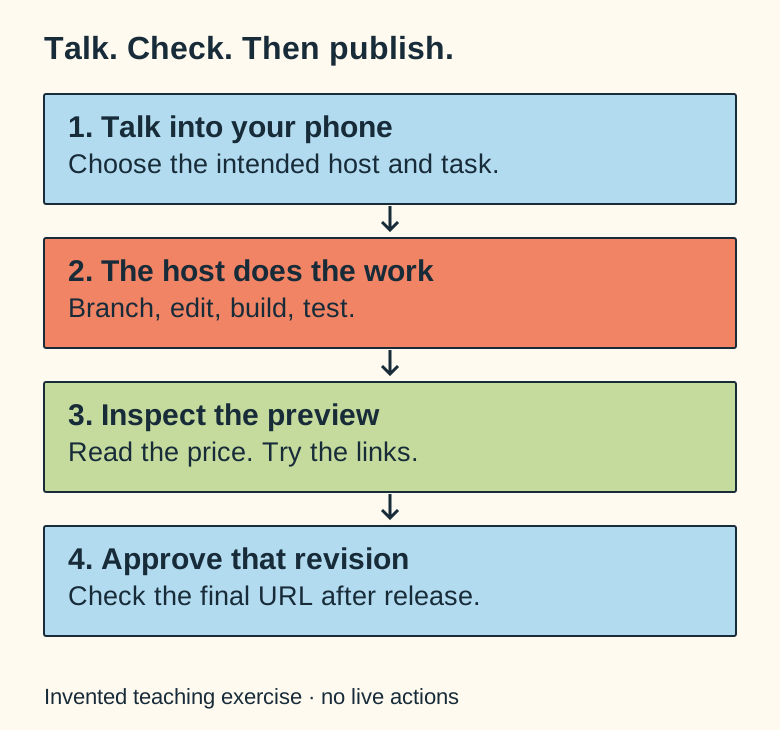
The route from your voice to the page
Phone dictation
→ authenticated agent session
→ isolated repository change
→ build and tests
→ hosting preview
→ your approval
→ production release
That approval step matters. You can automate repetitive checks without giving every unfinished voice thought permission to publish.
1. Choose your way in
Three practical routes are worth considering:
| Route | How your phone connects | What keeps the work running |
|---|---|---|
| Codex Remote | Pair the supported mobile experience with your development environment. | An available connected host or configured cloud environment. |
| Claude Remote Control | Connect a phone or browser to a signed-in local Claude Code session. | The computer and Claude process must stay running. |
| Hermes with Telegram | Send messages or voice through the configured gateway. | Your gateway host, model provider, and approved Telegram user access. |
Codex’s remote setup is authenticated; select the intended host and workspace. Its current voice documentation establishes live voice on iOS after pairing. On other phones, dictation into a message is a reasonable starting point unless live voice support is confirmed. Codex remote connections, voice documentation.
Claude Remote Control requires eligible subscription authentication; an API key alone doesn’t provide it. The documented commands include claude remote-control and /remote-control for an existing session. Claude Remote Control.
Hermes documents Telegram voice support, pairing, and allowed-user controls. Configure the model and test normal messages before adding voice. Don’t leave your development agent open to anyone who finds the bot. Hermes messaging.
Use the provider’s authenticated remote interface. You don’t need to expose SSH or a development server to the public internet to try this.
2. Connect one repository
Use a disposable practice site or a repository you’re authorized to change. Sign in to GitHub and give the agent access to that repository. Prefer the provider’s supported app or login flow. If you need a personal access token, limit its repository access, permissions, and lifetime. GitHub token guidance.
Before editing, ask for a tour:
Inspect this repository's instructions, current branch, local changes,
package scripts, and deployment rules.
Find the services page and its existing request link.
Tell me which files a new FAQ would need.
Do not edit, install, send, or deploy yet.
If another agent has changes in the workspace, preserve them. Use a separate worktree or branch rather than treating an unfamiliar change as rubbish to clean up.
These commands are useful after identifying the real repository and base:
git status --short
git remote -v
git branch --show-current
A project that already uses dev and an ignored .worktrees/ directory might then use:
git worktree add -b codex/phone-faq .worktrees/phone-faq devThat last command is an example, not a universal branch name. Read the repository’s rules first.
- Do: connect to the practice task and request the read-only repository tour.
- Check: the agent names your intended host, folder, branch, and existing request target.
- Save: that setup record. Resolve a wrong workspace before dictating an edit.
3. Give the site a preview
Import the repository into a compatible host and check the framework, project root, build command, and production branch. Vercel’s Git integration can create previews for nonproduction branches. Its environment variables can be scoped to Preview, Production, and specific preview branches; edits affect new deployments. Vercel Git deployments, environment variables.
A brochure site may need only GitHub and hosting. Railway is useful for a database or persistent worker. Its environments help separate configuration, but a copied database URL can still point to production. Check the destination, not the environment’s friendly name. Railway environments.
Cloudflare can manage DNS while Vercel hosts the application. If an agent needs DNS access, restrict its token to the intended zone and required actions. Cloudflare token setup.
For a first exercise, use sample content and no payment credentials. For a real app, separately verify the test database, sandbox payment account, webhook, email sender, and callback URLs before activating them in a preview.
4. Dictate a useful brief
Talk naturally. Then turn the brain dump into a short task with exact requirements.
Here’s our invented practice data:
Business: Practice Bike Repair
Tune-up: $75
Appointment requests: use the existing #request link
Do not invent same-day service, reviews, or opening times.
Here’s the spoken instruction:
Add a tune-up FAQ to the services page.
Use the supplied $75 price and existing request link.
Keep the layout, other prices, payment settings, and navigation.
Use a feature branch and run the relevant checks.
Show me mobile and desktop previews.
Do not publish until I approve it.
There’s enough context to act and enough boundary to avoid an accidental redesign. If you change your mind halfway through, say what replaces the earlier instruction. “Final decision: use this line” is more useful than leaving six competing versions in the conversation.
I use dictated feedback to iterate this site: a local preview, a specific correction, then another check. The useful part is the review loop. Voice is the easy input.
- Do: dictate the FAQ brief using the pack’s
website/index.htmlstarter. - Check: the agent repeats the $75 price and uses its existing
#requestlink. Ask it to clarify any conflicting instruction. - Save: the interpreted brief and preview URL before reviewing the page.
5. Check the thing you asked for
Open the preview yourself. Check the price, links, heading, keyboard behavior, and mobile layout. A screenshot is useful evidence, but it can’t prove a form submits or a checkout belongs to the correct account.
Ask the agent for:
- The changed files and a brief reason for each.
- The exact checks it ran and their results.
- A desktop and mobile view.
- Anything it couldn’t verify.
- Confirmation that unrelated prices, data, and production remain intact.
This repository uses npm run typecheck, npm test, and npm run build. Yours may use different commands. Inspect package.json rather than inventing a test script.
Previews should stay out of search. A noindex header or metadata helps with indexing; it isn’t a login wall. Use access protection if the preview contains anything private.
6. Publish the approved version
Approve a concrete preview and revision. Follow the repository’s existing release stages; don’t turn voice convenience into permission to skip them. Verify the final URL and deployed commit.
Keep the previous commit and deployment available. Vercel’s rollback can restore a deployment, but it won’t undo database changes, sent emails, or other external effects. Treat those recovery plans separately. Instant Rollback.
- Do: read the FAQ on phone and desktop, then follow its request link.
- Check: $75 is correct; no hours, availability, reviews, or service promises were invented. You can finish this exercise in preview.
- Save: the accepted revision and checks. Publish only if you separately approve that exact version.
Video planned, not recorded: phone dictation, the interpreted brief, and the real preview, followed by a pause to verify the price and link. Setup screens will need sanitized recordings and written alternatives. Read the future shotlists. The Website Factory portfolio and this site’s case study show related work.
What it costs
Starting points checked October 11, 2026:
| Service | Starting point | Watch separately |
|---|---|---|
| ChatGPT / Codex | Plus $20/month; Pro tiers $100, $200, or $500. | Account allowance, extra credits, and API billing when used. |
| Claude | Pro $20/month; Max starts at $100. | Eligibility, usage allowance, extra usage, and any specifically included API credits. |
| Hermes | Open-source software. | Chosen model, voice/tool services, hosting, and maintenance. |
| Vercel | Hobby for personal noncommercial use; Pro $20/month. | Usage, add-ons, seats, and domain costs. |
| Railway | Hobby $5/month; Pro $20/month. | Included usage and excess resource charges. |
Check your account before buying. A subscription doesn’t make every downstream service free. OpenAI pricing, Claude pricing, Vercel pricing, Railway pricing.
When it doesn’t work
If the host is asleep, restore the connection. If the agent picked the wrong workspace, stop before editing and select the right one. If a build fails, read the first useful error and fix that change. If preview configuration is missing, don’t borrow production credentials just to get a green screen.
If social sharing shows old artwork after a release, check the deployed metadata and the platform’s cache refresh tool. That is a different problem from the website build.
FAQ
Can every voice message automatically deploy?
You can connect automation to deployment, but a useful default is voice → change → checks → preview → approval. Give standing release authority only to a clearly bounded, tested process.
Do I need Vercel, Railway, and Cloudflare together?
No. Use the minimum stack your site needs. Hosting may be enough for a simple site. Add a database, worker, or DNS provider for a concrete requirement.
Is this the same as putting a chatbot on my website?
No. Here you’re directing a builder. A visitor-facing assistant is a separate feature, with different data and permissions. See website assistants, the Claude guide, or the Hermes guide.
Planned hands-on webinar
Speech to website
This guide is the living outline for a future session. No date or price is set yet. The waiting list and registration are not open yet.