Writing
Start a podcast. Build its production factory.
updated 2026-10-11
To start a podcast, record one useful idea, edit it into a listenable episode, and publish it through a podcast host. An agent-driven podcast factory adds a repeatable workflow around that recording: transcription, sound treatment, proposed edits, artwork, notes, captions, clips, approval, distribution, and a check that the release actually arrived.
The aim is less production effort, more consistent sound, and more useful ways for people to find your work. Those are outcomes to test. A pile of automatically generated clips is just a pile.
I’m planning a show with a firm rule: every finished episode is ten minutes or less, including introductions, outros, ads and title cards. Solo opinions, practical explanations, and later short interviews. Video when it helps. This guide describes the factory I’d build around that format; it hasn’t been built or tested here.
I’m turning this into the fifth hands-on webinar in this series. This guide is its living outline; see the webinar plans for the planned session. No date or price is set yet.
You’ll need: a phone or computer you already own, headphones, an editor, an assistant that can work with your transcript, and a private practice folder. Use invented material for the exercise. You can finish the pilot without buying a subscription or publishing anything.
You’ll finish with: one reviewed practice episode, a release packet, and a map of the steps a human or an API would perform.
Jump to tool choices, the production workflow, or the pilot.
1. Give the show a small, clear job
Write a one-page show brief before shopping for microphones:
- Who is listening, and what should they understand or try afterward?
- What belongs here: a rant, a recommendation, a practical explanation, or an interview?
- What stays out: confidential details, other people’s private stories, and claims you can’t support.
- Which formats and destinations will you use first?
- Who approves the episode, clips, artwork and promotional copy?
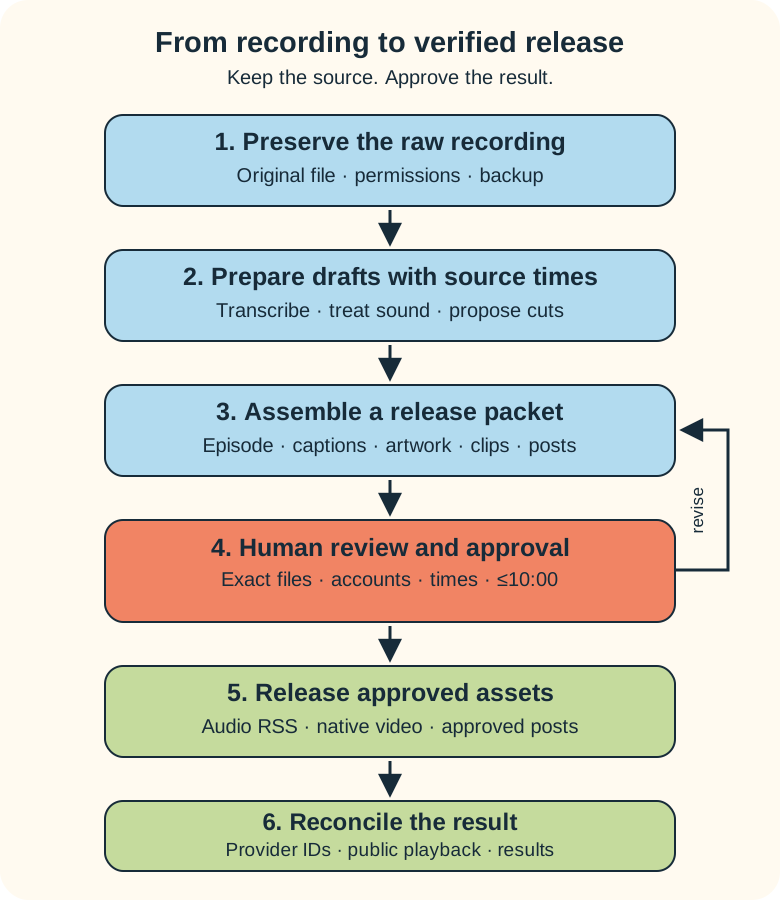
For this short format, aim for 7–9 minutes and use a 9:30 internal release limit to leave room for small finishing changes. The absolute limit is 10:00 in every released audio and video version. Check the export, including any host-added material. Disable automatic insertions you can’t keep inside that cap. Longer raw recordings can be edited or split into separately useful episodes.
A simple solo outline is: state the point, explain why it matters, give one example, offer one action, finish. For an interview, prebrief the guest and use two or three concise questions. Get permission to record, edit, release, and reuse agreed excerpts, including webinar use where relevant.
Start with your existing phone or Mac in a quiet, soft room. Record a short sample, listen on headphones, and fix distance or room noise first. An expensive microphone also records an expensive echo.
2. Choose one tool path
These are three possible builds. Pick the smallest one that solves a real production problem.
| Path | Working stack | Human handoffs |
|---|---|---|
| Start with what you have | Phone or QuickTime recording; Audacity for audio or iMovie for video; an assistant for transcript-based proposals; Spotify for Creators and YouTube Studio. | Apply edits, export, review, upload and schedule in the apps. |
| Let an editor do more | Descript transcription, text-based editing, Studio Sound and Create Clips; the same publishing destinations; Buffer for approved promotion. | Review edits and clips, export files, upload episodes, approve and schedule posts. |
| Build an API workflow | A small owned worker or n8n; timed transcription; Auphonic audio processing; FFmpeg rendering; Transistor hosting; YouTube and Buffer adapters. | Approve the versioned release packet; perform unsupported destination steps manually. |
Audacity is a free audio editor. QuickTime can record audio on a Mac; iMovie covers basic video editing. This first path is enough to learn your format. Agent help can begin with a transcript you provide manually.
Descript combines editing and clip preparation. Its free plan currently includes one media hour per month, 100 AI credits once, and watermarked 720p video exports. Media allowances and AI credits are separate; Studio Sound and clip creation consume AI credits. Check the current plan before relying on it for weekly production. Descript pricing.
Descript also offers API and MCP editing. The middle path above uses the app and manual exports. Before replacing those handoffs, verify the current API’s media-export contract with a disposable file; an editor’s share link and a file ready for your podcast host are different deliverables.
The API path introduces usage charges, hosting and maintenance. Transistor’s Starter plan currently starts at US$19/month and includes API access; its video API requires a video-enabled plan. Auphonic offers two processed hours per month free, with an Auphonic jingle on free productions. That jingle counts toward the runtime. Reprocessing also consumes allowance. Transistor pricing, video API requirements, Auphonic pricing.
Don’t buy the whole third row to record episode one. Prove the workflow manually, then automate the repetitive steps you can describe and check.
3. Preserve the recording before improving it
Give each episode an ID and keep its files together:
P001/
  originals/       untouched recording and guest permission
  working/         transcript, edit list, processing settings
  review/v1/       episode, clips, captions, notes, artwork, posts
  approved/v1/     exact approved files and approval record
  receipts/       destination IDs, URLs, status checks, analytics
This is a proposed local structure, not a required product. Back it up separately. Provider workspaces and temporary upload links aren’t your archive.
Record the source filename, duration and checksum. Keep a timed source transcript alongside a corrected release transcript. The edit list should map each retained passage back to the original recording. For interviews, preserve speaker labels and separate tracks when available.
Choose retention and deletion rules before sending media to a provider. Keep confidential information out of the source recording. Removing it from the final cut doesn’t remove the upload you already made.
- Do: copy the practice recording into
originals/and create its episode record. - Check: you can find and play the original independently of the editor.
- Save: the source identity, permissions and backup location.
4. Treat sound and meaning separately
Transcription helps an agent understand the recording. Audio processing changes the sound. Editing changes which recorded passages remain.
Gemini’s audio capabilities support understanding and transcription, and its transcription API documents speaker labels and timestamps. Its audio-understanding API is not an audio restoration or waveform-editing API. Asking it to “clean this up” doesn’t establish that it returned repaired audio.
Auphonic provides leveling, loudness normalization, noise and reverb treatment, and an API. Descript Studio Sound provides speech enhancement and noise reduction; its process can reconstruct speech audio. Compare before and after. Check consonants, breaths, names, tone and audio/video sync. More processing isn’t always better.
Generating replacement speech or cloning a voice is a separate editorial decision. Descript’s Regenerate can recreate voice audio around an edit. Keep replacement speech and voice cloning off by default. A rerecorded line is often easier to verify. Any approved synthetic replacement needs the speaker’s permission and appropriate disclosure.
Video planned, not recorded: compare an original sample with two treatment strengths. Pause on the point where the voice starts sounding processed. The exercise works without this video.
5. Ask for edits with reasons and source times
Have the agent propose cuts before applying them. Removing a repeated sentence is usually straightforward. Removing “I haven’t tested this” because it slows the pace changes the claim.
Use a brief like this:
Prepare a draft release from this source recording and timed transcript.
Keep the speaker's meaning, qualifications, jokes and corrections.
Do not add claims, replacement speech, music or public uploads.

Propose cuts with source in/out times, quoted source text and a reason.
Target 7–9 minutes; reject a finished version over 10:00.
Flag uncertain words and facts for review.

Suggest at most two clips that each make sense on their own.
Include source times, the exact passage and any context the clip needs.
Draft notes, a reviewed-transcript checklist, captions, artwork copy
and two promotional posts. Mark unsupported statements.
Return a review packet. Do not publish or schedule anything.
Check suggested times against the recording; a plausible timestamp can still be wrong. After editing, update captions and chapter times to match the final timeline.
Descript Create Clips can suggest excerpts and help format captions and aspect ratios. A custom workflow can turn an approved cut list into files using FFmpeg trimming, cropping and subtitle filters. In either case, inspect the rendered result.
Choose clips for a complete thought, a useful example, or a clear question and answer. Keep qualifications with the claim. Review faces, framing, caption placement and the opening sentence. A “viral” score isn’t evidence that the excerpt represents you fairly.
For webinar snippets, retain the source episode and time range, check whether the explanation needs a fresh introduction, and confirm the permission covers reuse. A useful snippet can become part of a larger lesson without pretending the old recording was made for it.
6. Approve a release packet you can play
The factory should prepare one review page or folder containing:
- The finished episode, its measured runtime, and the proposed title.
- Corrected transcript, summary, source links and timed captions.
- Artwork or thumbnail, including readable text and usage rights.
- The selected clips in their final layouts.
- Exact promotional copy, destination accounts and proposed release times.
Use a reusable artwork template first. An agent can populate the episode title or propose a new illustration; review the final image, spelling and rights. Don’t generate a fake guest photograph.
Approval belongs to a specific version. Record the approved file checksums, text, destinations and times. Changing a clip, claim, thumbnail or export after approval creates a new review version. An approved edit list still needs a final playback check.
Listen to the whole short episode. Spot-check the transcript against it, including names, numbers and negations. Play every clip. Confirm the ending survives the cut and all formats stay within the ten-minute cap. ffprobe can measure media duration; it can’t tell you whether the joke still works.
- Do: review
v1and request one concrete revision if needed. - Check: the packet contains final media, accurate captions and the intended accounts.
- Save: approval for the exact version, or clear reasons it remains a draft.
7. Publish audio and video through the right doors
An audio podcast host stores the episode and maintains its RSS feed. Submit that feed to listening directories. Native platform video is another release destination.
Spotify for Creators provides free hosting. A Spotify-hosted show appears on Spotify automatically; other directories require submission. Spotify-native video reaches Spotify as video, while other RSS destinations receive audio. Spotify distribution guidance.
For a first build, upload and schedule in Spotify’s app. This guide doesn’t assume a general Spotify hosting API. Use a dedicated show-contact address: enabling the RSS feed exposes its email address publicly. Spotify RSS guidance.
On YouTube, upload the approved full video and organize full episodes in a podcast playlist. Its RSS import makes a still-image video from audio; choose native video or RSS import for an episode so you don’t publish it twice. Keep clips separate from the full-episode podcast playlist. YouTube podcasts, RSS import.
Apple also supports video through eligible hosts using HLS. That adds host and account setup; keep it outside the first audio release unless video distribution is already supported in your chosen plan. Apple video publishing.
For the API path, use explicit adapters:
| Destination | Documented operation | Required check |
|---|---|---|
| Transistor | Authorize a media upload, create a draft episode, then use a separate publish/schedule endpoint. | Processing complete; intended show, version and timezone. |
| YouTube | Authorized video upload with explicit privacy settings; publishAt schedules eligible private, never-published videos. | Processing, captions, podcast playlist and actual visibility. |
| Buffer | Create an approved post with its channel and scheduled time. Some channels use notification publishing. | Automatic delivery or a human completion step, then the actual post. |
These capabilities are documented in the Transistor API, YouTube upload API, YouTube scheduling properties, and Buffer scheduling example. Account authorization, provider limits and unsupported metadata still need handling. An API key isn’t a production system.
Video planned, not recorded: show one approved packet going to an audio host and a private YouTube upload. Then show the public result and its receipt. Use practice accounts or recorded mock screens until publication is authorized.
8. Check receipts before celebrating
Track each destination separately:
approved → upload accepted → processing → scheduled → public verified
                                                   ↘ needs attention
“Scheduled” is a useful status. It doesn’t mean anyone can play the episode yet. Save provider IDs, status responses and the final public URL. Check the host feed and intended listening apps, then verify promotional links point to the released episode.
A scheduled worker can reconcile pending jobs. n8n’s Schedule Trigger uses the workflow or instance timezone and requires a published workflow. Set the timezone deliberately; keep publication gated by approval.
Give each job a stable identity: episode, approved version, destination and action. Store its result before advancing. After a timeout, look up the existing provider record before creating another episode or post. Use limited retries with increasing delays for retryable failures; pause and report unresolved ones. Don’t assume every provider supports an idempotency key. Put large originals in your archive and pass controlled references to workers.
Measure production time, review time, corrections, processing cost and delivery failures during the pilot. Later, compare episode completion, useful replies and visits to the full episode. Keep each platform’s definition with its figures; podcast downloads and video views aren’t interchangeable. Some reporting will remain a dashboard or export task: Buffer documents legacy analytics operations without a current API equivalent.
9. Run a small pilot before connecting publication
Use an invented 60–90 second episode: “Label the drawer so you can find the cable again.” Make one point, give one example, suggest one action, finish. Include a pause and a repeated sentence for the editor to propose removing. Include the sentence, “This might help; I haven’t timed it.” That qualification must survive.
Record it only when you’re ready to practice. Keep the source, provide its transcript, and use the editing brief above. Produce one episode, one captioned clip, a simple title graphic and one promotional draft. Don’t connect publishing credentials for this pass.
- Do: complete the workflow manually, noting where you repeat a mechanical step.
- Check: the qualification remains, source times are correct, captions match, and runtime is within the cap.
- Save: the release packet, review notes and measured effort. Mark publishing receipts “not attempted.”
Video planned, not recorded: run this pilot from source folder to approval packet, then pause while participants check their own exports.
Automate one demonstrated handoff next. Once setup is proven, the day-to-day job should become recording raw material, answering flagged questions, and approving the prepared release. The factory handles the repetitive work and reports exceptions. You still get to have opinions.
Frequently asked questions
Can an agent repair every recording?
No. Enhancement can help with uneven levels and some noise, but results need listening checks. Start with a usable source, preserve it, and rerecord when processing damages the voice.
Can one upload distribute audio and video everywhere?
No. Audio RSS, Spotify-native video, YouTube uploads and Apple’s host-supported video have different routes. Map each destination and keep manual handoffs explicit.
What should I automate first?
Start with transcription, repeatable packaging or status checks after a manual pilot. Keep editorial approval before publishing, and measure whether the automation actually reduces work.
Build your first release, then its factory
Start with one short episode and a review packet you understand. Add automation where it removes proven repetition. That gives you a chance to spend more time on the idea and less time renaming final-final-really-final.mp4.
For a guided build, see the podcast-factory webinar plans. For help setting up your workflow, request a scoped podcast-factory setup: describe your formats, existing tools, destinations and the step that takes too much effort. Scope, deliverables, provider costs and price would be agreed before work begins.
Planned hands-on webinar
Start a podcast and build its factory
This guide is the living outline for a future session. No date or price is set yet. The waiting list and registration are not open yet.